MS Outlook does not provide a built-in capability to search contacts by email address. However, there are a couple other ways to search in Outlook for a contact by email address. This article demonstrates the optimal method for searching contacts in Outlook by email address. To ease your work, you can now search for people contacts in Outlook by email address.
In a situation where the user needs to search Outlook contacts by email address, Outlook Forensics Wizard is the conclusive solution. Allows the user to retrieve the required contact's information in Outlook just by entering the email address. The finest part is that the tool is accessible to experts, companies, and individual users alike. In general, it is a solution to the issue of & that everyone may access. How can I search for contacts in Outlook based on their email addresses?
So, we invite you to stay at this place to learn:
Let’s consider some user request to better understand the reason why the user wants to search Outlook contacts by email address?
User Query 1:
Hello, I’m Robert Paul and I lead a team of 25 people in the sales department. We provide service in the education sector. Recently, some of our clients complained that they received fewer classes than required. But, according to our team, they were given full classes. We maintain a list of our clients by name, email address, contact and number of classes. Now, we want to search Outlook contact by email address of those customers. It’s possible? If yes, suggest a professional solution.
User Query 2:
Ik ben Dr. Will Stephen. Mijn receptioniste heeft me laten weten dat in de patintgegevens enkele contactgegevens ontbreken. Ik weet niet hoe dit is gebeurd? Ik wil de contactgegevens van die klanten krijgen. Wilt u weten Hoe kan ik Outlook-contact zoeken op e-mailadres?
The above questions demonstrate the importance of searching Outlook contacts by email address. Now, the following instructions will lead you through the process of locating an Outlook contact by email address step by step.
Outlook Contact Search Tool comes with an advanced option that allows the user to find Outlook contacts by email address in a couple of clicks.
1. Download the software on your machine.

2. Then, click on the "Open With" tab and choose Open Configured Outlook Data File, Choose from a folder, and Recent Files.
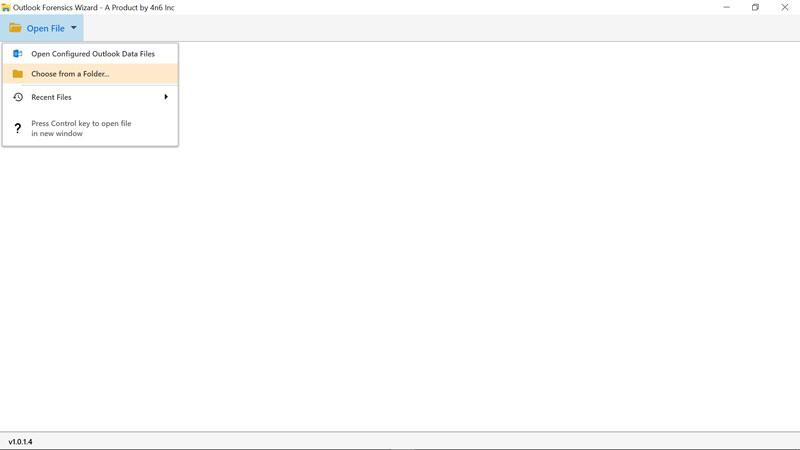
3. Now, the tool will display all the folders in the software interface.
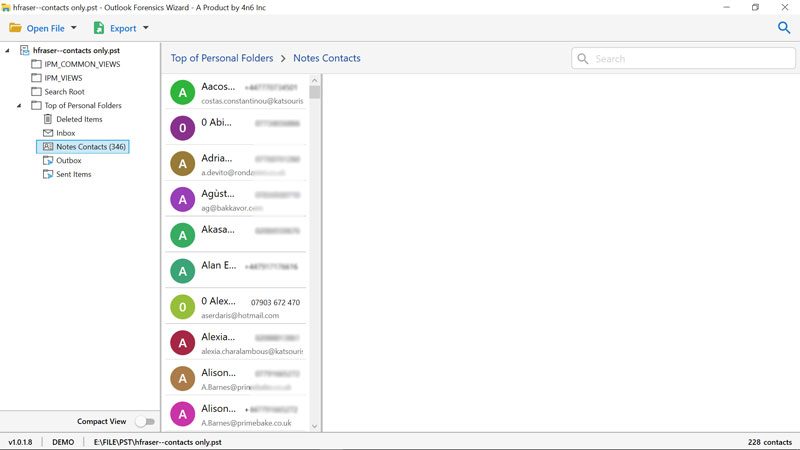
4. Pick the contact folder and click on it. The tool will showcase all the contacts in it.
5. In this step, select "Advanced Search option." Enter the email address and click on the Find button,
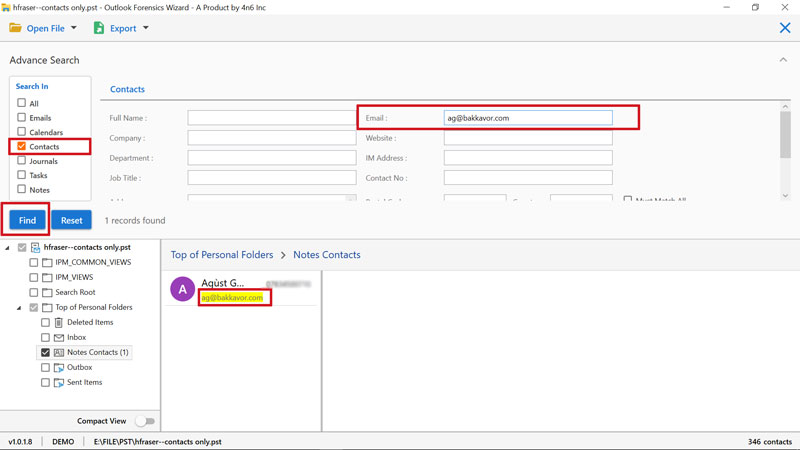
The utility starts searching for Outlook contact by email address. It will instantly give you the result.
In this way, using Outlook Contact Search Application, you can find desired Outlook contact by email address in mere steps. You can also save filters Outlook contacts to PDF, CSV, EML, and HTML format. Now, let’s know the benefits of using Outlook Manager Tool
Quick & Easy
If you perform an Outlook contacts search by email address using the usual approach of examining each email, you will expend much time and energy. However, with the enhanced solution, you may search for an Outlook contact directly by email address.
Contacts with Images
If you have saved the contacts with images, the software will also showcase the names of the contacts with images in the Software panel. It is a reliable application and does not alter any information.
Maintains Folder Hierarchy
The utility maintains the complete hierarchy of folder when searching Outlook contacts by email address. Also, it manages the complete information.
Save data in Multiple File Format
If you want to save searched Outlook contacts by email address in a different file format like PDF, HTML, CSV, and more. You can check the "Export" option.
Supports all Windows OS
This Outlook Data Viewer software is compatible with all the versions of Windows. Also, it supports all the Outlook versions.
Now you know the best method to search Outlook contacts by email address. If you want to test the utility before activating the licensed version, you can download the trial version. Its working is same as mentioned in the above post. When satisfied with the tool, download the pro version of the software.