Nokia Phonebook Recovery Tool
4n6 Nokia IB File Converter
Extract and convert contacts from Nokia Series 30+ phonebook backup files (phonebook.ib) to vCard, CSV, Excel, JSON and other universal formats.
Download Free Trial
100% Safe & Secure • Windows 11/10/8/7
Buy Full Version
30 Days Money-Back Guarantee*
- Open and convert phonebook.ib files from Nokia Series 30+ feature phones
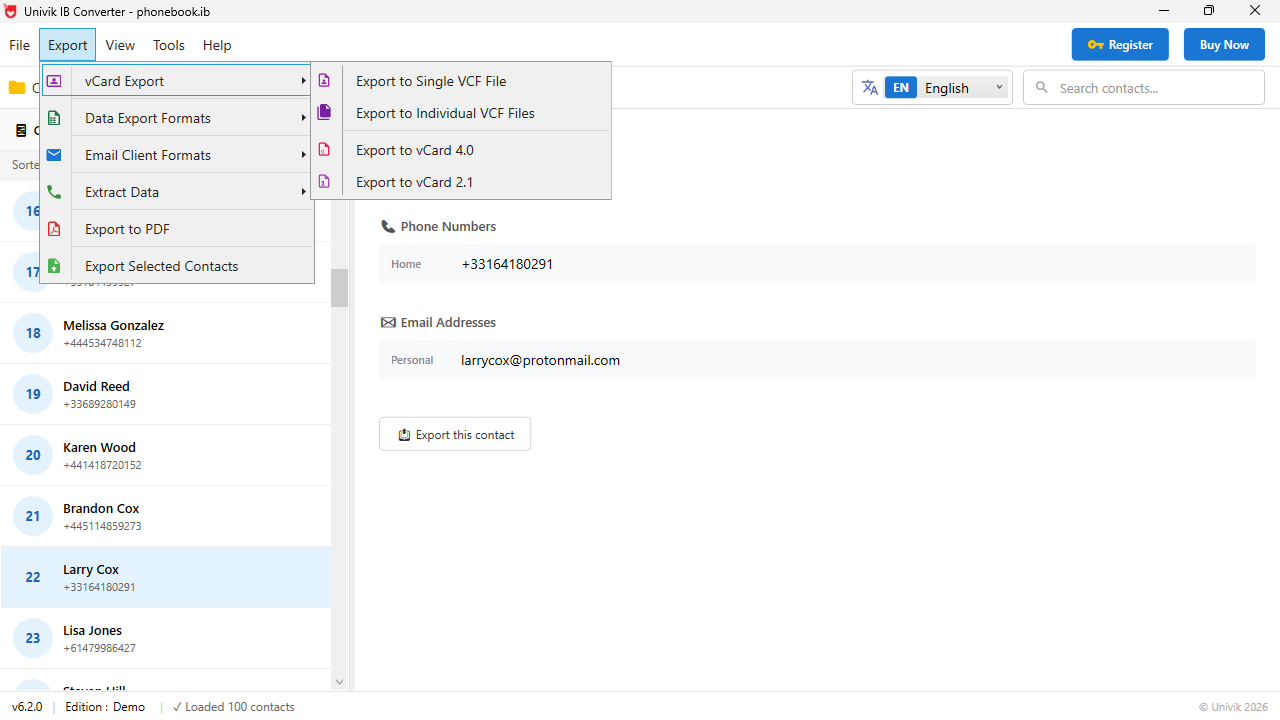
- Export contacts to vCard (VCF), CSV, Excel XML, JSON, XML, HTML and plain text
- Supports Nokia 105, 106, 130, 150, 215, 225, 3310 (2017), 8110 4G and more
- Preview all contacts with names and phone numbers before conversion
- Selectively export specific contacts or convert the entire phonebook at once
- Works with the companion ibphone_head.in index file for accurate parsing
- Standalone Windows application with no Nokia PC Suite dependency
- Handles phonebook backups containing multi-byte characters and international names
Why Nokia IB Files Are Impossible to Open
Nokia Series 30+ feature phones store contact backups in a proprietary binary format called phonebook.ib. No standard contact manager or phone transfer tool can read these files.
The Problem
- The phonebook.ib file is a proprietary Nokia binary format with no public specification
- Nokia PC Suite has been discontinued and does not recognize IB files from Series 30+ phones
- Standard VCF importers, Outlook and Google Contacts cannot read the IB format
- Renaming the file extension does not work because the internal structure is completely binary
- When a Nokia phone breaks or resets, the phonebook.ib file on the SD card becomes the only copy of your contacts
The Solution
- 4n6 IB File Converter parses the Nokia binary format and extracts every stored contact
- Converts contacts to vCard (VCF) for direct import into any phone, email client or cloud service
- Also exports to CSV, Excel XML, JSON, XML, HTML and TXT for archival or spreadsheet use
- Provides a visual contact preview so you can verify names and numbers before exporting
- No Nokia phone or Nokia software needed. Works entirely on your Windows PC with just the IB file
Convert Nokia IB Contacts to 7 Standard Formats
Export your Nokia phonebook contacts into formats that work with every phone, email client and cloud service available today.
vCard (VCF)
The universal contact format accepted by every smartphone, email client and cloud service worldwide:
- Import to iPhone / Android
- Import to Google Contacts
- Import to Outlook / iCloud
CSV & Excel XML
Open your Nokia contacts in spreadsheet applications for data management and analysis:
- Microsoft Excel
- Google Sheets
- LibreOffice Calc
JSON & XML
Structured data formats for developers, CRM imports and database migration workflows:
- JSON (structured)
- XML (hierarchical)
- API & database ready
HTML & Plain Text
Readable output formats for printing, archival and quick reference use:
- HTML (browser viewable)
- TXT (plain text list)
- Print-ready format
Key Features of Nokia IB File Converter
Visual Contact Preview
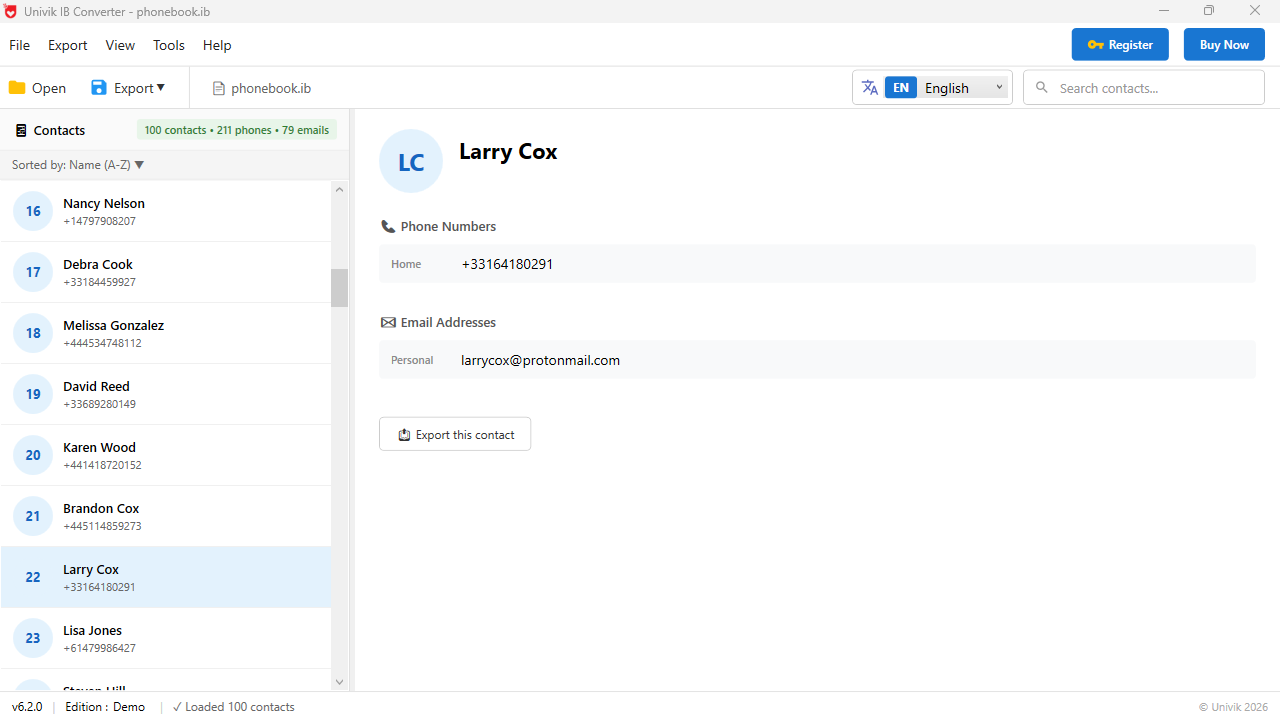
Before exporting anything, preview every contact extracted from the IB file directly in the software panel. Each entry displays the stored name and all associated phone numbers so you can verify accuracy.
Selective Contact Export
Choose exactly which contacts you want to export. Select individual entries, a range or the entire phonebook. Useful when you only need a few key contacts from a large backup file.
Multi-Number Contact Handling
Nokia feature phones often store multiple phone numbers per contact (home, work, mobile). The converter correctly identifies and maps each number to the right field in the output format.
Unicode and International Names
Full support for contacts stored with non-Latin characters including Arabic, Hindi, Chinese, Cyrillic and accented European characters. The converter preserves all multi-byte encodings accurately.
Fully Standalone Application
No Nokia PC Suite, no Nokia phone connection and no internet access needed. Just point the software at your phonebook.ib file on your PC, USB drive or SD card and start converting.
24/7 Customer Support
Need help locating your phonebook.ib file or understanding the export options? Our support team is available around the clock via live chat and email to guide you through the process.
Supported Nokia Feature Phones
The 4n6 IB File Converter works with phonebook.ib backup files created by any Nokia Series 30+ feature phone. Here are the confirmed compatible models.
Any Nokia device running Series 30+ (S30+) or Nokia Series 40 that creates phonebook.ib backup files is supported.
How to Convert Nokia IB Files: Working Process
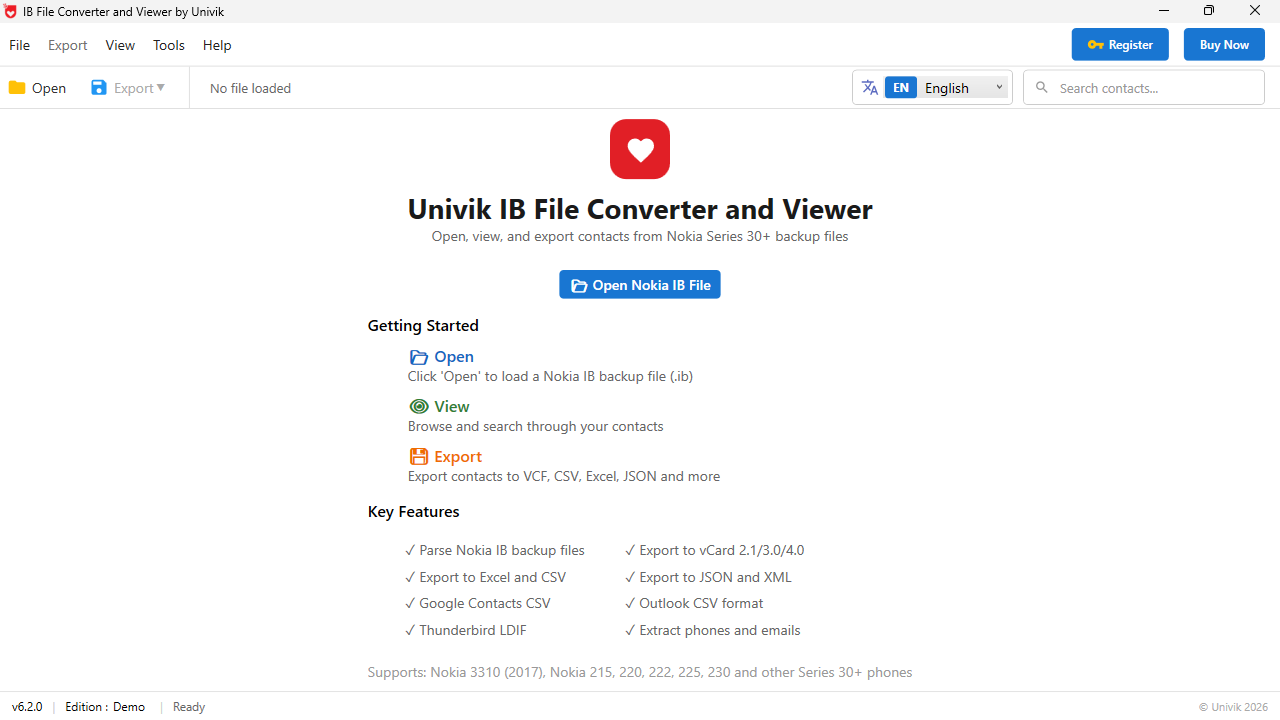
Recover your Nokia contacts in three simple steps. No technical knowledge required.
Where to Find phonebook.ib on Your Nokia Phone
📱 From the Nokia Phone Directly
Connect your Nokia phone via USB and select Mass Storage mode. Navigate to the Backups folder on the phone storage or SD card. Look for a subfolder named like Contacts-backup_[date] containing phonebook.ib and ibphone_head.in.
💾 From an SD Card / Memory Card
Remove the micro SD card from your Nokia phone and insert it into your computer using a card reader. Browse to the Backups folder in the root directory. The phonebook.ib file will be inside a dated contacts backup subfolder.
💻 From a Previous PC Backup
If you previously copied files from your Nokia phone to your PC, search for phonebook.ib in your Documents, Downloads or any backup folders. The file is approximately 10-500 KB depending on how many contacts were stored.
What Our Users Say
Frequently Asked Questions About
Nokia IB File Conversion
Quick answers to common questions about converting Nokia phonebook.ib files.
A phonebook.ib file is a proprietary binary backup file created by Nokia Series 30+ feature phones when you perform a contacts backup. It stores all contact names, phone numbers and related data in a format that can only be read by the Nokia phone itself or a specialized converter tool like the 4n6 IB File Converter.
All Nokia Series 30+ feature phones create phonebook.ib backup files. This includes popular models like Nokia 105, 106, 130, 150, 215, 216, 220, 222, 225, 230, 3310 (2017), 8110 4G, 2720 Flip, 6300 4G and Nokia 800 Tough.
Connect your Nokia phone via USB and select Mass Storage mode. Or remove the SD card and insert it into a card reader. Navigate to the Backups folder. Inside you will find a subfolder named with the backup date (e.g., Contacts-backup_08-11-2024_13-54-53) containing phonebook.ib and ibphone_head.in files.
The ibphone_head.in file is a companion index file that Nokia creates alongside the phonebook.ib file during backup. It contains metadata and structural information that helps the converter parse the IB file more accurately. If available, keep both files in the same folder when using the converter.
Yes. The VCF (vCard) format is universally supported. You can import the converted file directly into iPhone (via iCloud), Android (via Google Contacts), Samsung, Xiaomi, OnePlus or any other smartphone. You can also import into Outlook, Gmail, Yahoo Mail and other email clients.
No. The 4n6 IB File Converter is completely standalone. It does not require Nokia PC Suite, Nokia Suite or any other Nokia software. It also does not need your Nokia phone to be connected during conversion. You only need the phonebook.ib file.
The free trial allows unlimited preview of all contacts stored in the IB file. Export is limited to the first 10 contacts per file in the demo version. The licensed version removes this limitation and enables unlimited export of all contacts.
Yes. The converter fully supports Unicode and multi-byte character encodings. Contacts stored in Arabic, Hindi, Chinese, Japanese, Korean, Cyrillic, Thai and accented European characters are all preserved correctly during conversion.
Built by File Format Conversion Experts
ForensikSoft Engineering Team
The Nokia IB File Converter is developed by ForensikSoft (a division of 4n6 Inc.), dedicated exclusively to file format conversion, digital forensics and data recovery since 2013. Our team combines deep expertise in binary file format analysis, mobile data parsing and cross-platform contact migration.

ForensikSoft develops file conversion and forensic data tools trusted by individuals, businesses and IT professionals across 120+ countries.
Contact Us →Software Specifications
Recover Your Nokia Contacts Today
Your Nokia phonebook.ib file contains every contact stored on your phone. Extract them now before the file gets lost or the SD card fails.